Source Adapter Configuration
The TAVM framework supports any number of source adapters which fetch CTI data from different sources.
By default, the framework loads all source adapters which have a YAML configuration file located in the config/sources directory.
The configuration file lookup-path can be changed in the general.yaml configuration file, see Core Settings.
Each source adapter must have a unique id which is defined by the configuration file name.
Source Adapter Concepts
Source adapters are configured via a YAML configuration file. The configuration filename contains the name of the adapter, for example rss.
For each source adapter, a corresponding plugin folder must exist in the plugins/sources directory (path can be overridden in general.yaml, see Core Settings).
The folder for an example rss source adapter would be plugins/sources/rss.
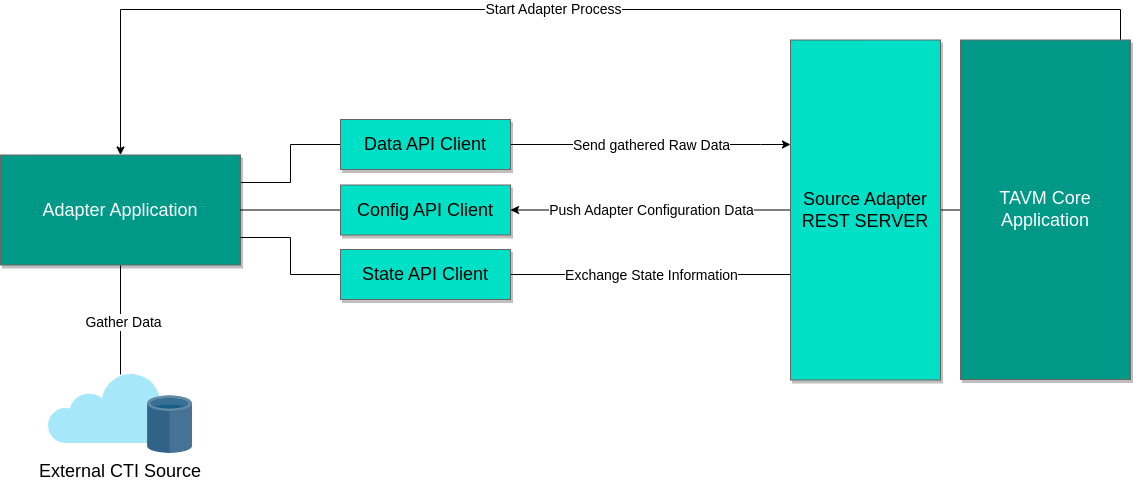
TAVM will start each source adapter as a separate process. The entrypoint of the process can be defined in the configuration file. By default, the application will search for the executable in the plugin folder.
As source adapter may require a persistent data, the core application will store the adapter state in a MongoDB database. State updates are sent to from and to the adapter via a REST API. The documentation of the REST API can be viewed as Swagger JSON document which can be found here.
An architectural overview of the source adapter concept can be seen in the following image:
Configuration File Naming
As each source adapter must have a unique id, the configuration file name must follow a specific format:
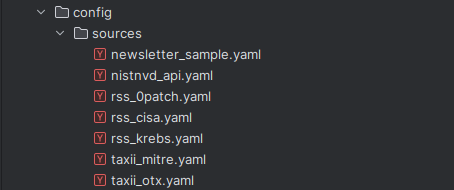
<adapter_name>_<instance_id>.yaml
The <adapter_name> is the name of the source adapter. For example rss.
As one adapter can be started multiple times, the <instance_id> is used to distinguish between different instances of the same adapter.
The combination of <adapter_name> and <instance_id> must be unique across all source adapters.
A folder with the source name (<adapter_name>) must exist in the source plugin directory.
Sample filenames can be seen in the following image:
Configuration File Format
The YAML configuration of source adapters must contain the following fields:
- Enabled: A boolean flag that specifies if the adapter is enabled or not.
- Description: A short description of the adapter.
- Executable: The path to the executable of the adapter. The path is relative to the adapter plugin folder. An absolute path can also be used.
The configuration allows the following optional fields:
- Configuration: A custom YAML object that contains adapter specific configuration.
A sample configuration file for the RSS source adapter can be seen here:
Enabled: true
Description: "Fetches CTI data from RSS feeds"
Executable: ./run.sh
Configuration:
  Url: https://krebsonsecurity.com/feed/
  FetchInterval: 30s