Integrated Source and Transformation Adapters
TAVM comes with a set of integrated source and transformation adapters which can be used out of the box. The adapters cover a wide range of use cases and can be used as a starting point for custom adapters.
Source Adapters
Source adapters are used to fetch CTI data from external sources. The fetched data is then sent to the TAVM core application via REST API.
The data that is transferred to the backend has to be in JSON format. The JSON object contains the following fields:
- DataSetId (String): an ID which is unique for that adapter.
- DataSetTimestamp (Date/Time): the publication timestamp of the data set.
- SourceRef (String): a reference to the source of the data set (e.g. a link to the blog post).
- ContentType (String): the content type of the data set. This is used to determine which transformation adapter should be used to transform the data set.
- Contents (String): the actual raw data set encoded as string.
The API documentation for the source adapters can be found here.
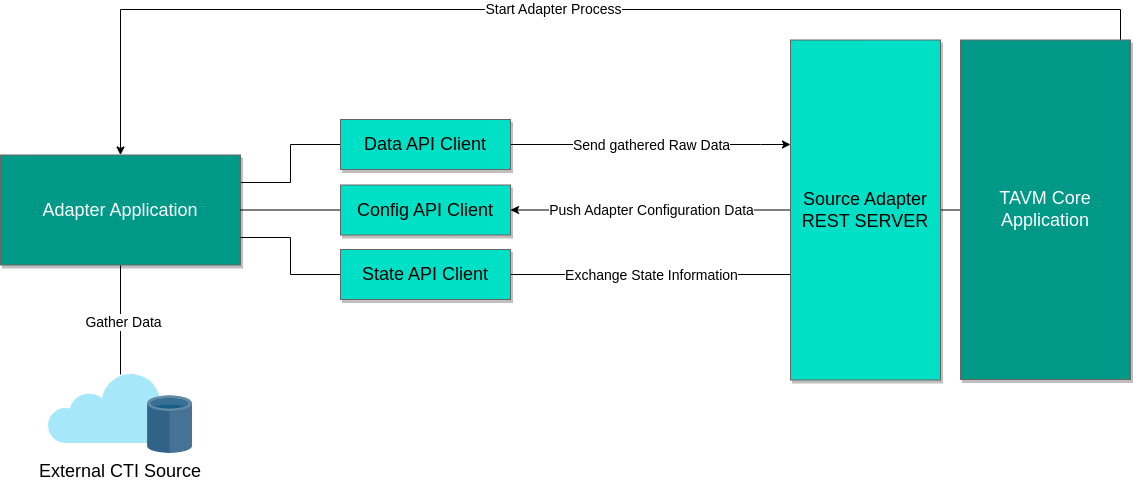
The following source adapters are available by default:
- RSS
- Newsletter
- Nist NVD
- TAXII
RSS
The RSS source adapter fetches CTI data from RSS feeds.
The adapter uses the gofeed library to parse the RSS feeds. It supports RSS, Atom and JSON feeds.
The adapter stores the timestamp of the latest seen feed-entry in its state and will only fetch new entries afterwards.
The adapter configuration must contain the following fields:
- Url: The URL of the RSS feed.
- UserAgent: The user agent string which is used for fetching the feed. Defaults to
TAVM/1.0. - FetchInterval: The time interval in which the adapter will fetch new data from the feed.
- FetchTimeout: The timeout in seconds for fetching the feed. If the timeout is reached, the adapter will retry to fetch the feed in the next interval.
The output content type of the adapter is json-feed. The data itself is a JSON object that contains all feed data like timestamp, title, author and content.
Newsletter
The newsletter source adapter fetches CTI data from IMAP mailservers. It can be used to fetch information from mailinglists or newsletters.
This adapter is written in Python and only uses the standard library to communicate with the IMAP server.
The adapter configuration must contain the following fields:
- Server: IMAP server hostname or IP.
- Port: IMAP server port, defaults to 993.
- Ssl: A boolean flag to indicate that the connection should be encrypted. Defaults to false.
- User: The username for the IMAP server.
- Password: The password for the IMAP server.
- Mailbox: The mailbox that should be queried for new mails. Defaults to
INBOX.
The output content type of the adapter is email.
Nist NVD
The National Vulnerability Database contains a list of known vulnerabilities. The NVD source adapter can be used to fetch the latest CVEs and CPEs from the NVD.
The adapter uses the Golang library nvdapi to query the NVD API.
The adapter configuration must contain the following fields:
- UserAgent: The user agent string which is used for fetching the feed. Defaults to
TAVM/1.0. - FetchInterval: The time interval in which the adapter will fetch new data from the feed.
- FetchTimeout: The timeout in seconds for fetching the feed. If the timeout is reached, the adapter will retry to fetch the feed in the next interval.
- ApiToken: The NVD API key. This key is required to circumvent the rate limit of the NVD API. It can be requested here.
The output content type of the adapter is json-cve for CVE records and json-cpe for CPE records.
TAXII
The TAXII source adapter allows to integrate arbitrary TAXII servers into TAVM. It supports TAXII servers with version 2.0 and 2.1.
The adapter uses the Python library taxii2-client to query the TAXII server.
The adapter configuration must contain the following fields:
- BaseUrl: The TAXII server base url. Take a look at the official documentation to learn more.
- Version: The TAXII server version. Must be either
v20orv21. Defaults tov21. - VerifySsl: A boolean flag to indicate the SSL certificate should be verified. Defaults to true.
- Interval: The time interval in which the adapter will fetch new data from the server.
- User: The username for the TAXII server. Optional.
- Password: The password for the TAXII server. Optional.
- ApiRoot: Api root name, if left blank, the default api root will be queried.
- Collection: Collection title or id, if left blank, the first collection is used.
The output content type of the adapter is stix/[VERSION], where [VERSION] is the STIX document version (for example 2.0 or 2.1).
Transformation Adapters
A transformation adapter is used to transform raw CTI data into STIX 2.1 documents.
Each adapter is responsible for a specific content type. A special case is the * content type which can be used to transform any content type.
Transformation adapters offer a REST API which is called by the TAVM core application to transform the data. The raw data is sent as JSON payload using a POST request. The response contains the transformed data as JSON or STIX payload. The exact output format depends on the adapter and is specified in the adapter configuration.
The core application also provides a REST API, similar the one for the source adapters, to send configuration data to the adapter.
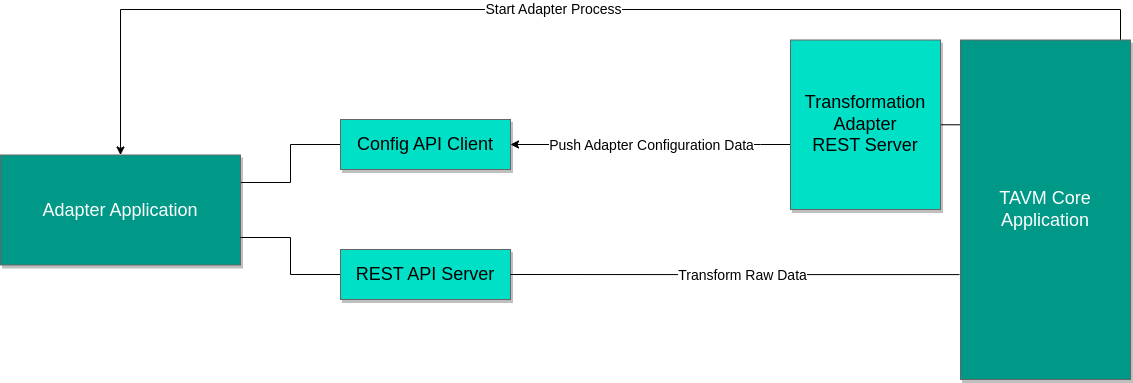
The following transformation adapters are available by default:
- CVE
- Feed
- Passthrough
- STIX Stepper
- Repo-Miner
CVE
The CVE transformation adapter transforms CVE and CPE records into STIX 2.1 documents. It requires no special configuration.
The adapter supports the following content types:
json-cve: CVE recordsjson-cpe: CPE records
The email transformation adapter converts the email body into a STIX 2.1 document. It can use an LLM to extract structured data from the email body. If no LLM should be used, the adapter will extract only basic information from the email. The basic information includes ip addresses and urls.
To enable LLM's, the adapter configuration must contain the following fields:
- openai_api_key: The API key for OpenAI.
- use_llm: A boolean flag to enable the use of LLM's. Defaults to false.
The adapter only supports the content type email.
Feed
The feed transformation adapter transforms RSS feeds into STIX 2.1 documents. It can use an LLM to extract structured data from the feed body. If no LLM should be used, the adapter will extract only basic information from the email. The basic information includes ip addresses and urls.
To enable LLM's, the adapter configuration must contain the following fields:
- openai_api_key: The API key for OpenAI.
- use_llm: A boolean flag to enable the use of LLM's. Defaults to false.
The adapter only supports the content type json-feed.
Passthrough
The passthrough adapter does not really transform data. It is used to pass STIX 2.1 documents from a specific source (most likely a TAXII 2.1 server) to the output adapter. No configuration is required for this adapter.
The adapter only supports the content type stix/2.1.
STIX Stepper
The STIX stepper adapter is used to transform STIX 1.0, 1.1 and 2.0 documents into STIX 2.1 documents. It therefore uses the official STIX2.0 to STIX2.1 migration script.
The adapter does not support any configuration options.
Supported content types:
stix/1.0stix/1.1stix/2.0
Vulnerable Git Repository Mining Adapter (Repo-Miner)
The vulnerable Git repository mining adapter is a special transformer adapter which is used to extract Git repositories which contain vulnerable software components.
The adapter uses the wildcard content type * as it can extract Git repositories from any raw CTI data.
Extraction is done by searching for Git repository URLs using regular expressions.
The adapter has custom configuration options to specify the Git repository types that should be extracted. A sample configuration which contains extraction patterns for GitHub, Bitbucket and GitLab can be seen here:
Enabled: true
Description: A repository URL extractor
ContentType: "*"
OutputType: repominer
Executable: ./run.sh
Configuration:
  repositories:
    github.com:
      matcher_regex: "github.com[/:]([\\w-.]+)/([\\w-.]+)"
      url_compiler: "github.com/$1/$2"
    gitlab.com:
      matcher_regex: "gitlab.com[/:]([\\w-.]+)/([\\w-.]+)"
      url_compiler: "gitlab.com/$1/$2"
    bitbucket.org:
      matcher_regex: "bitbucket.org[/:]([\\w-.]+)/([\\w-.]+)"
      url_compiler: "bitbucket.org/$1/$2"
To add more repository types, simply add a new entry to the repositories object.
All capture groups in the matcher regex can be used in the URL compiler ($X will be replaced by the contents of capture group X).