Extending the Framework with Custom Adapters
TAVM is designed to be easily extensible. This section describes how to extend the framework with custom input and transformation adapters.
If the existing adapters do not fit your needs, you can create your own adapters in any programming language. The only requirement is that the adapter can be started by the TAVM core application as a separate standalone process. The communication between the adapter process and the core application is done via REST API calls.
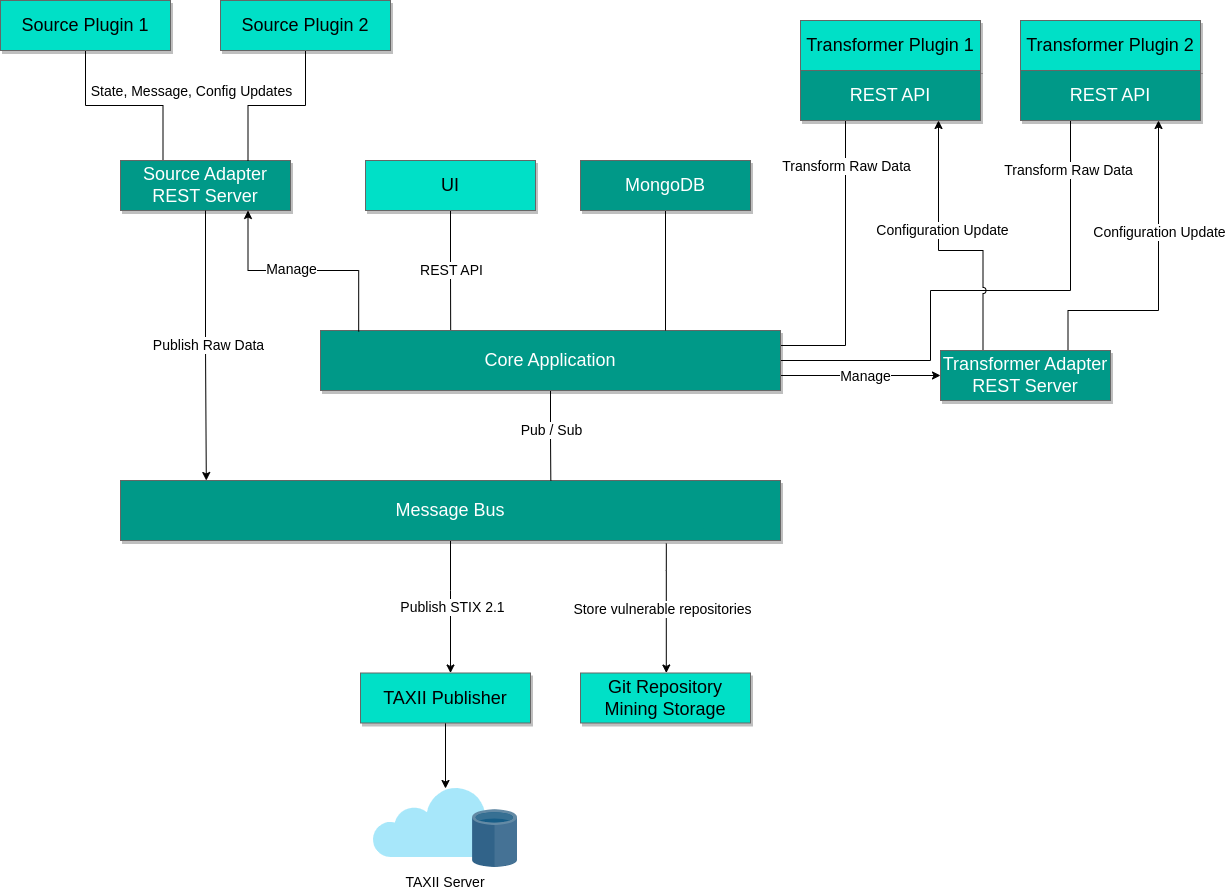
A helper library for Golang and Python exists, that makes it easier to implement custom adapters.
The library handles the communication with the core application and provides a simple interface to implement the adapter logic.
If you use Python or Go, the library in the plugins/lib directory can be used.
Source Adapters
To build a custom source adapter, you need to implement a REST API client to handle the communication with the core application. The REST API documentation can be viewed as Swagger JSON document which can be found here.
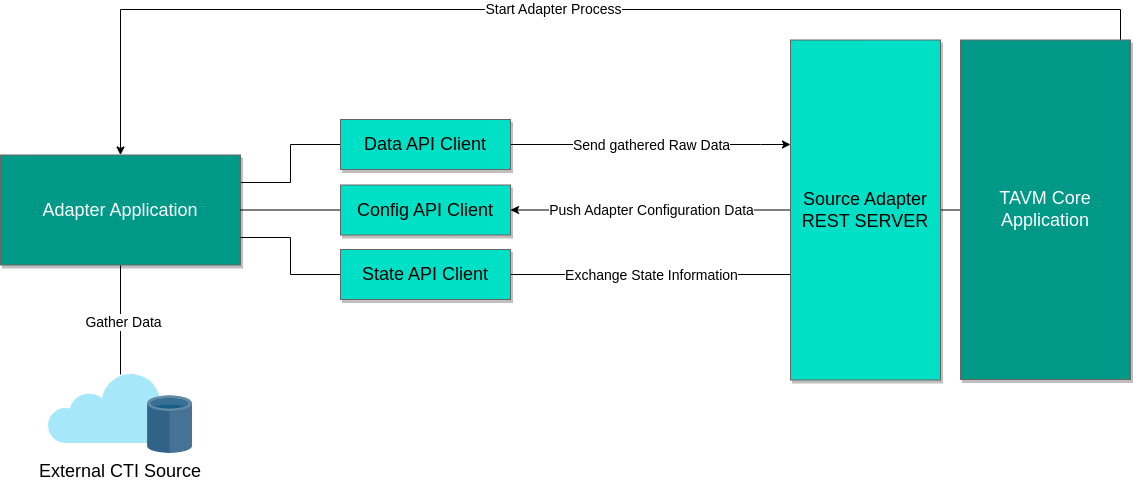
Basic Flow of a source adapter
- The adapter is started by the core application. It gets passed some configuration parameters via environment variables:
- TAVM_ID: The ID of the adapter. This ID is used to identify the adapter in the core application and should be used to prefix all log messages.
- TAVM_TOKEN: The authentication token for the backend REST API. This token is used to authenticate the adapter with the core application.
- TAVM_ENDPOINT: The URL of the backend REST API.
- The adapter pushes information about its own configuration options to the backend. This information is currently not used, but can be used in the future to automatically generate a configuration UI for the adapter.
- The adapter fetches the configuration data from the backend.
- The adapter starts its main routine, where it fetches data from external sources.
- If the adapter is stateful, it fetches the last persisted state from the backend.
- The adapter fetches new data from the external source and publishes the data to the backend.
- If the adapter is stateful, it persists the current state to the backend.
- The adapter waits for the next fetch interval and then repeats the process from point 5.
The adapter code or binary should be placed in the plugins/sources/[adapter name] directory.
The adapter name must be unique, checkout the adapter configuration for how to use the newly created source adapter.
Transformer Adapters
To build a custom transformation adapter, you need to implement a REST API server and client to handle the communication with the core application.
The REST API documentation for the backend API can be viewed as Swagger JSON document which can be found here. This API is used to fetch configuration values from the backend.
The transformation requests are sent from the core application to the adapter via a REST API. Therefore, a REST API server must be implemented in the adapter.
The API server must provide a POST endpoint, that handles the raw data as input and returns either a STIX 2.1 bundle or a JSON document.
The expected response format is specified in the Accept header of the request.
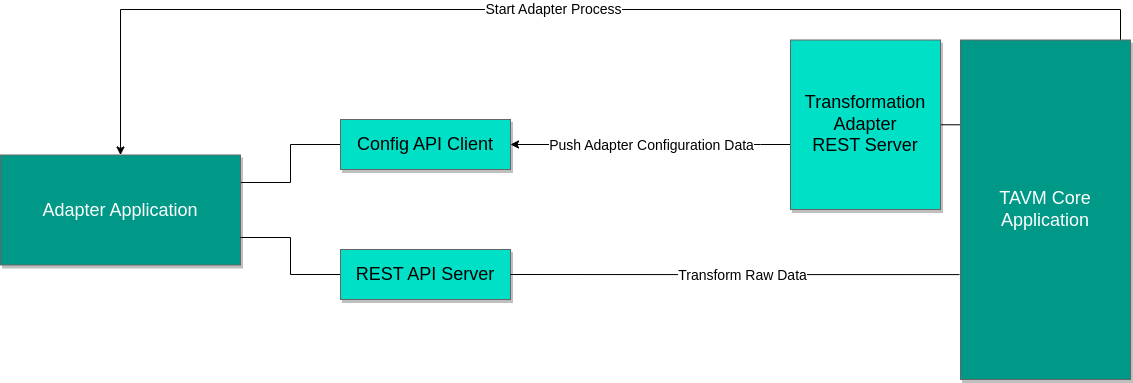
The URL and port on which the REST API server should listen is passed to the adapter via configuration parameters:
- listen_port: The port on which the REST API server should listen.
- listen_path: The path on which the POST endpoint should be exposed.
The TAVM core application uses the configuration parameter transformation.api-external-transformer-url (which defaults to http://localhost) as the base URL for the API requests.
The timeout of transformation requests is fixed to ten minutes.
Basic Flow of a Transformer Adapter
- The adapter is started by the core application. It gets passed some configuration parameters via environment variables:
- TAVM_ID: The ID of the adapter. This ID is used to identify the adapter in the core application and should be used to prefix all log messages.
- TAVM_TOKEN: The authentication token for the backend REST API. This token is used to authenticate the adapter with the core application.
- TAVM_ENDPOINT: The URL of the backend REST API (used to fetch configuration values).
- The adapter pushes information about its own configuration options to the backend. This information is currently not used, but can be used in the future to automatically generate a configuration UI for the adapter.
- The adapter fetches the configuration data from the backend.
- The adapter starts a REST API server on the port and path specified in the fetched configuration.
- The adapter waits for transformation requests from the core application.
- If a POST request on the transformation endpoint is received, the adapter transforms the raw data and returns the result to the core application.
The adapter code or binary should be placed in the plugins/transformers/[transformer id] directory.
The adapter id must be unique, checkout the adapter configuration for how to use the newly created transformer adapter.